
從 Compat 2021 到 Interop 2022
Compat 2021 致力於消除瀏覽器相容性問題的五個主要焦點領域,使開發者可以在這些領域上自信地建立可靠的基礎。而 Interop 2022 的重點是在15個開發者認為在不同瀏覽器之間缺失或存在相容性問題時尤其困擾的領域上制定基準。約 2216 字 (12分鐘閱讀)

在 Ubuntu 操作系統中,當我在作業時,打開 VSCode 的 Git History 遇到了 「Could not register service workers」的錯誤訊息,於是上網查找解決方法,以下為解決方法的內容翻譯搬運做一個紀錄,原因果然又是 Ubuntu 在搞事情... ( ´・ω)
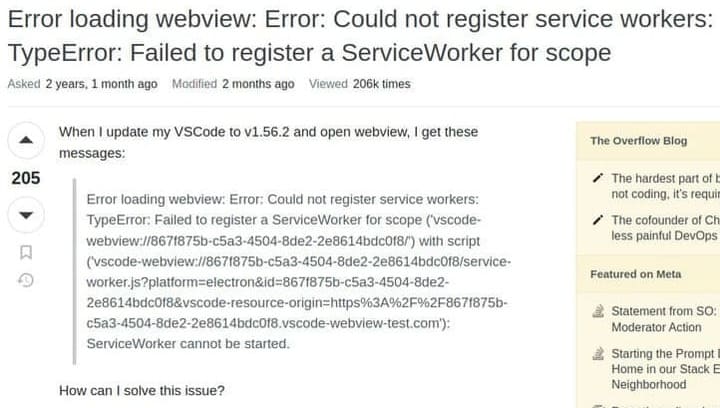
Error loading webview: Error: Could not register service workers: TypeError: Failed to register a ServiceWorker for scope ('vscode-webview://867f875b-c5a3-4504-8de2-2e8614bdc0f8/') with script ('vscode-webview://867f875b-c5a3-4504-8de2-2e8614bdc0f8/service-worker.js?platform=electron&id=867f875b-c5a3-4504-8de2-2e8614bdc0f8&vscode-resource-origin=https%3A%2F%2F867f875b-c5a3-4504-8de2-2e8614bdc0f8.vscode-webview-test.com'): ServiceWorker cannot be started.
How can I solve this issue?
If you are using Ubuntu, there is probably another (maybe hidden) VSCode process, which is causing the problem.
如果您使用的是 Ubuntu,則可能有另一個(可能是隱藏的)vscode 進程導致此問題。
Close the vs code first and in terminal try:
killall code.
首先關閉 VSCode,然後在終端嘗試輸入 killall code。
visual studio code - Error loading webview: Error: Could not register service workers: TypeError: Failed to register a ServiceWorker for scope - Stack Overflow
[譯文] Error: Could not register service workers
作者
約 2216 字 (12分鐘閱讀)
約 2161 字 (11分鐘閱讀)

約 1851 字 (10分鐘閱讀)